Skip to content
MAJOR UPDATE 2.0 -> CHECK OUT HERE
  • Documentation
  • Changelog
  • Support
  • Agency
  • Documentation
  • Changelog
  • Support
  • Agency
Purchase
Login
Purchase
Login

ACF Elementor Custom Icons

Transform Your Site with Dynamic Custom Icons

Enhance your WordPress site with the plugin that connects Advanced Custom Fields (ACF) and Elementor.

Adds a fast, searchable Icon Picker to ACF β€” with Font Awesome, IcoMoon / Fontello custom sets, and now your own SVG uploads.

Paired with a powerful dynamic Elementor widgetΒ that renders icons from any ACF field type β€” Simple, Group, Repeater, Flexible Content and Taxonomy Terms β€” with full styling control, hover effects and animation. No code required.

  • Lifetime license
  • Fully supported
  • 14-Day Money-Back Guarantee

Unlock the Power of Custom Icons in ACF and Elementor

Advanced Custom Fields: Elementor Custom Icons is a powerful plugin designed to bridge the gap between ACF and Elementor, allowing you to add custom icons effortlessly to your WordPress site.

Custom Icon Field for ACF

Custom Icon Field for ACF

Experience enhanced customization with our Custom Icon Field for Advanced Custom Fields (ACF).

Select which icon sets to display per field: the full Font Awesome 6 library included by default, your own IcoMoon / Fontello sets uploaded through Elementor, and β€” new in 2.0 β€” your own custom SVG files uploaded directly from the plugin settings.

Fully compatible with Flexible Content, Repeater fields and Taxonomy Terms, giving you dynamic, flexible icon selection throughout your entire website.
Purchase

Backend Icon Selector

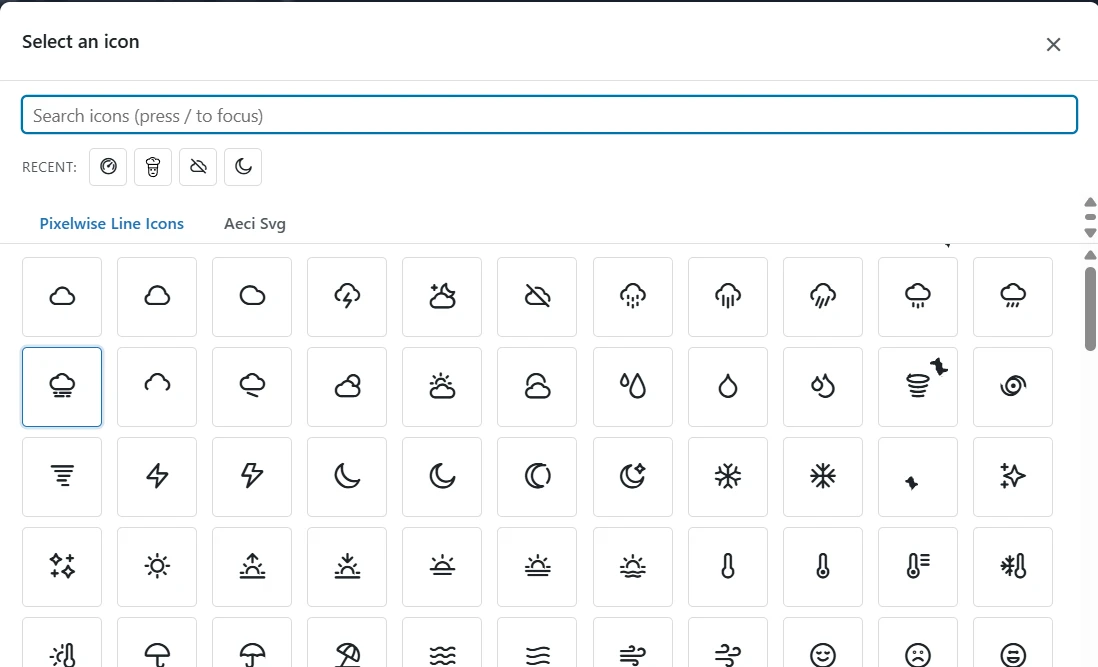
Find the perfect icon instantly with the all-new icon picker β€” completely rebuilt in version 2.0.

The selector opens in a fast, virtualized grid that handles thousands of icons without lag. A search bar (press / to focus it instantly) filters by name across all sets simultaneously. Navigate with keyboard shortcuts β€” arrow keys browse, Enter selects, Esc closes. A Recent icons strip at the top keeps your most-used icons one click away.

Switch between icon sets β€” Font Awesome, your IcoMoon / Fontello uploads, and your SVG library β€” using the tabs at the top of the picker.
Purchase

Elementor Widgets with Custom Fields

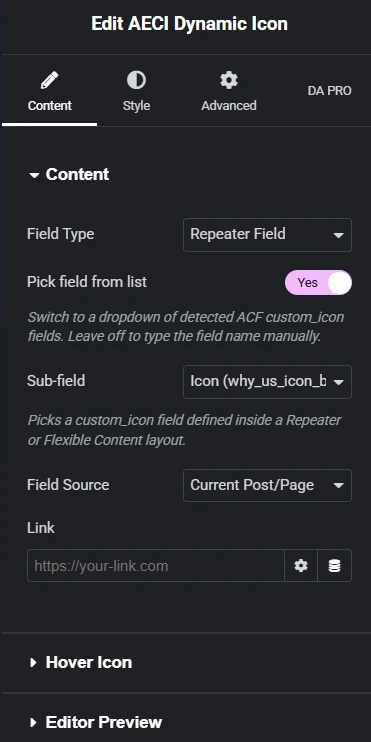
The new AECI Dynamic Icon β€” one unified widget that replaces three legacy widgets and handles every ACF field type: Simple, Group, Repeater, Flexible Content and Taxonomy Term fields.

Enter the ACF field name, or use the smart dropdown to pick from all detected custom icon fields. Set the field source (current post or Options Page) and optionally add a link.

New in 2.0: enable Hover Swap to show a different icon on hover β€” static or read from another ACF field. Choose from 9 built-in animations (Spin, Pulse, Beat, Bounce and more). Use Editor Preview to display a placeholder icon inside the Elementor editor when the widget is inside a loop template.

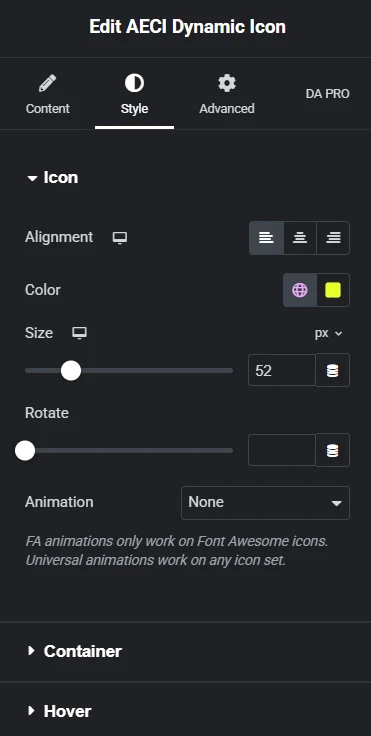
In the Style tab: full control over alignment, color, size, rotate, background, border, padding, border radius, box shadow β€” with a separate Hover sub-tab for hover-state overrides and transition duration.

Purchase

All Features

AECI Dynamic Icon Widget
  • One unified widget for every ACF field type: Simple, Group, Repeater, Flexible Content and Taxonomy Term.
  • Smart field picker: type the field name manually or choose from a dropdown of all detected ACF custom icon fields.
  • Field Source control: current post/page or Options Page.
  • Optional link wrapping with target and rel controls.
  • Legacy widgets (ACF Custom Icon, ACF Flexible/Repeater, ACF Taxonomy Term) remain available for backwards compatibility.
Custom Icon Field for ACF
  • New custom icon field type for any ACF field group.
  • Per-field control over which icon sets are available in the picker.
  • Compatible with Flexible Content, Repeater fields and Taxonomy Terms.
All-New Icon Picker (v2.0)
  • Fully rebuilt β€” fast, virtualized grid handles thousands of icons without lag.
  • Search bar across all sets simultaneously. Press / to focus instantly.
  • Keyboard navigation: arrow keys, Enter to select, Esc to close.
  • Recent icons strip β€” your most-used icons one click away, persisted per user.
  • Per-set tabs: Font Awesome, IcoMoon / Fontello uploads, Custom SVGs.
Custom SVG Library (New in 2.0)
  • Upload your own SVG files β€” individually or in bulk β€” from Settings β†’ AECI Custom Icons β†’ SVG Library.
  • Supports any icon library in SVG format: Heroicons, Phosphor, Lucide, Tabler Icons and more.
  • All uploads are automatically sanitized: scripts, event handlers and external references removed.
  • SVGs rendered inline β€” inherits Color, Size, Hover Color and Rotate from the widget controls automatically.
Hover Swap Icon (New in 2.0)
  • Display a different icon when the user hovers the widget.
  • Static mode: pick any icon from any installed set.
  • Dynamic mode: read the hover icon from a second ACF custom icon field on the same record.
  • Adjustable transition duration. Respects prefers-reduced-motion.
Animations (New in 2.0)
  • 9 built-in CSS animations: Spin, Pulse, Beat, Shake, Fade, Bounce (Font Awesome), plus universal Spin, Pulse and Bounce that work on any icon set including custom SVGs.
Editor Preview (New in 2.0)
  • Show a static placeholder icon inside the Elementor editor when the widget is inside a loop or repeater template where no real data is available.
  • Placeholder is never shown on the front-end.
Dynamic Tags (New in 2.0)
  • Use any ACF custom icon field as a Dynamic Tag in any Elementor ICONS control β€” Icon Box, Icon List, Social Icons, Buttons and more.
Font Awesome 6
  • Full FA Solid, Regular and Brands library included. No CDN or internet connection required.
Custom Icon-Font Sets
  • Upload IcoMoon or Fontello sets through Elementor’s Custom Icons screen. Auto-detected by AECI.
Dynamic Styling Options
  • Color, size, alignment, rotation, animation, background, border, padding, border radius, box shadow.
  • Full Normal / Hover state control with configurable transition duration.
  • All controls responsive (mobile / tablet / desktop breakpoints).
Performance
  • Icon font CSS and the picker JSON catalog load only on screens and pages that actually use AECI β€” not on every page-view.
  • Server-side rendering β€” no JavaScript dependency for icon display on the front-end.
Security
  • Strict whitelist-based SVG sanitizer (XXE-safe via LIBXML_NONET). Sanitization runs at upload and read time.
  • License options excluded from WordPress autoload query.
  • Full data cleanup on plugin uninstall.
Easy to Use
  • Intuitive interface suitable for both developers and non-developers.
  • No coding skills required. Full PHP helper function available for template use.
Seamless Integration
  • Compatible with ACF Free and ACF Pro. Repeater and Flexible Content require ACF Pro.
  • Works with the latest versions of WordPress, Elementor and Elementor Pro.
Purchase

Pricing

Licences that scale with you.

Personal

1 website

€ 14,90

  • Lifetime license
  • Fully supported
  • 1 activation
  • 14-Day Money-Back Guarantee
Purchase

Freelancer

5 websites

€ 35,90

  • Lifetime license
  • Fully supported
  • 5 activations
  • 14-Day Money-Back Guarantee
Purchase

Professional

10 websites

€ 59,90

  • Lifetime license
  • Fully supported
  • 10 activations
  • 14-Day Money-Back Guarantee
Purchase

Are you an Agency?

Contact us for a custom quote.

Contact Us

FAQ

Have questions? We have answers.

What is Advanced Custom Fields: Elementor Custom Icons?

Advanced Custom Fields: Elementor Custom Icons is a powerful WordPress plugin that seamlessly integrates custom icons into your website. It extends the functionality of both Advanced Custom Fields (ACF) and Elementor, allowing you to select and display custom icons, including Font Awesome and your own uploaded icon sets. With compatibility for Flexible Content and Repeater fields, it offers dynamic and flexible icon management throughout your site.

How do I install and activate the plugin?
After purchasing the plugin, download the ZIP file from your confirmation email or account dashboard. In your WordPress admin panel, navigate to Plugins > Add New, click on Upload Plugin, and select the downloaded ZIP file. Install and activate the plugin. Then go to Settings > AECI Custom Icons, click the License tab, enter your key and click Activate License.
Do I need both ACF and Elementor to use this plugin?

Yes, this plugin is designed to enhance the capabilities of both Advanced Custom Fields and Elementor. You need to have both plugins installed and activated on your site to utilize all the features offered by Advanced Custom Fields: Elementor Custom Icons.

Can I use my own custom icon sets?
Yes, in two ways. Icon-font sets (IcoMoon, Fontello): upload them through Elementor’s Custom Icons screen β€” AECI auto-detects every set you upload there. Individual SVG files: go to Settings > AECI Custom Icons > SVG Library and upload one or multiple SVG files directly. Uploaded SVGs are sanitized and stored securely. You can use icon libraries like Heroicons, Phosphor, Lucide or Tabler by downloading their SVG files and uploading them in bulk.
Is Font Awesome included?

Yes, Font Awesome is included by default. You have immediate access to the entire Font Awesome library, giving you thousands of icons to choose from without any additional setup.

How do I add a Custom Icon field in ACF?

In your WordPress admin panel, navigate to Custom Fields > Field Groups and either create a new field group or edit an existing one. Add a new field and set the Field Type to Custom Icon. Configure any additional settings as needed, such as selecting which icon sets to include. Assign the field group to your desired post types or pages.

How does the icon selection work in the backend?

When editing a post or page with a Custom Icon field, you’ll see an icon selector interface. Clicking on the field opens an overflow window displaying all available icons in a grid format. You can browse through the icons or use the search bar to quickly find a specific icon by name.

Can I use the plugin with Flexible Content and Repeater fields?

Yes, the plugin is fully compatible with ACF’s Flexible Content and Repeater fields. This means you can dynamically add and manage icons within flexible layouts and repeating field groups, providing greater flexibility in your content design.

How do I display custom icons in Elementor?
The plugin includes the AECI Dynamic Icon widget β€” one unified widget that handles every ACF field type. In the Elementor editor, search for “AECI Dynamic Icon” and drag it into your layout. In the Content tab, choose your Field Type (Simple, Group, Repeater, Flexible or Taxonomy Term), enter the ACF Field Name, choose the Field Source (post or Options Page), and optionally add a link. The Style tab gives you full control over color, size, alignment, animation and hover effects.
What styling options are available for icons in Elementor?

Within the Elementor editor, the Custom Icon widget’s Style tab offers extensive customization options. You can adjust the icon’s alignment, size, and color for both normal and hover states. This allows you to tailor the icon’s appearance to match your site’s design perfectly.

Will the plugin slow down my website?

The plugin is optimized for performance and is designed to have minimal impact on your site’s loading speed. It efficiently loads icon fonts and scripts only when necessary. However, as with any plugin, it’s recommended to test its performance impact, especially if you have a large number of icons or complex layouts.

How do I receive updates and support?

To receive automatic updates and access support, ensure your license is activated. With an active license, you’ll receive update notifications directly in your WordPress dashboard, and you can update the plugin with one click. For support, you can contact our team via email or through our support page.

What happens if I don't activate my license?

If you don’t activate your license, the plugin’s functionality will be disabled. You won’t receive automatic updates or have access to support services.Β 

Can I use this plugin on multiple sites?
License usage depends on the terms specified at the time of purchase. Some licenses allow for use on multiple sites, while others are limited to a single site. Please refer to your license agreement or contact us for clarification on your specific license terms.
I'm experiencing issues with custom icons not displaying.
  • Ensure your icon font files are correctly formatted and uploaded.
  • Verify that there are no conflicts with other plugins or themes.
  • Contact our support team for further assistance.
Is the plugin compatible with my theme and other plugins?

Advanced Custom Fields: Elementor Custom Icons is designed to be compatible with most themes and plugins, especially those that follow WordPress coding standards. However, conflicts can occasionally occur. If you encounter any compatibility issues, please reach out to our support team for assistance.

Do you offer refunds?

We stand behind the quality of our plugin and believe it will meet your needs. If you experience issues that we cannot resolve, we offer a 14-day money-back guarantee. Please review our refund policy on our website for full details.

Is there documentation or tutorials available?

Yes, we provide comprehensive documentation and tutorials on our website. These resources cover installation, setup, and advanced usage scenarios to help you get the most out of the plugin.

How can I request a new feature or enhancement?

We welcome user feedback and are always looking to improve our plugin. If you have suggestions for new features or enhancements, please contact us through our support page or email us directly. Your input is valuable and helps shape future development.

What should I do if I encounter an error or bug?

If you experience any issues, please contact our support team with detailed information about the problem. Include screenshots, error messages, and steps to reproduce the issue if possible. We are committed to resolving any bugs promptly to ensure the best experience for our users.

ACF Elementor Custom Icons

by Pixelwise Studio

Help

  • Documentation
  • Changelog
  • Support
  • Agency
  • Documentation
  • Changelog
  • Support
  • Agency

LEGAL

  • Privacy Policy
  • Cookies Policy
  • Terms and Conditions
  • Privacy Policy
  • Cookies Policy
  • Terms and Conditions
© 2023 - . Pixelwise Studio Ltd. All Rights Reserved.
Manage Consent
To provide the best experiences, we use technologies like cookies to store and/or access device information. Consenting to these technologies will allow us to process data such as browsing behavior or unique IDs on this site. Not consenting or withdrawing consent, may adversely affect certain features and functions.
Functional Always active
The technical storage or access is strictly necessary for the legitimate purpose of enabling the use of a specific service explicitly requested by the subscriber or user, or for the sole purpose of carrying out the transmission of a communication over an electronic communications network.
Preferences
The technical storage or access is necessary for the legitimate purpose of storing preferences that are not requested by the subscriber or user.
Statistics
The technical storage or access that is used exclusively for statistical purposes. The technical storage or access that is used exclusively for anonymous statistical purposes. Without a subpoena, voluntary compliance on the part of your Internet Service Provider, or additional records from a third party, information stored or retrieved for this purpose alone cannot usually be used to identify you.
Marketing
The technical storage or access is required to create user profiles to send advertising, or to track the user on a website or across several websites for similar marketing purposes.
Manage options Manage services Manage {vendor_count} vendors Read more about these purposes
View preferences
{title} {title} {title}
Login
Log into Your Account

Lost Password?

Are you an affiliate? Login here.

  • Documentation
  • Changelog
  • Support
  • Agency
  • Documentation
  • Changelog
  • Support
  • Agency
Purchase
  • Privacy Policy
  • Cookies Policy
  • Terms and Conditions
  • Privacy Policy
  • Cookies Policy
  • Terms and Conditions